Building the Future of Architecture
Generate floor plans, BIM models, BOQs, architectural renders and 3D walkthroughs in minutes from text, sketches, PDFs and CAD files.


Give it anything. Get back everything.
 IN·01A briefPDF · DOCX · TXT
 IN·02A floor planPDF · PNG · JPG
 IN·03A CAD or BIM fileDWG · DXF · IFC
 IN·04A photo of a buildingJPG · PNG · HEIC
 MODEL·01Editable floor plan
 MODEL·02IFC modelviewer free
 MODEL·03Walkable 3D modelin browser
 Photoreal renderssix shots
 Walkthrough film15 sec
 Bill of quantities₹ · IS 1200
 Shop drawingswith the take-off
 Renovation filmbefore → after
From flat plan to photoreal to walkthrough.
Real output from one plan — drag the slider, then play the rooms.
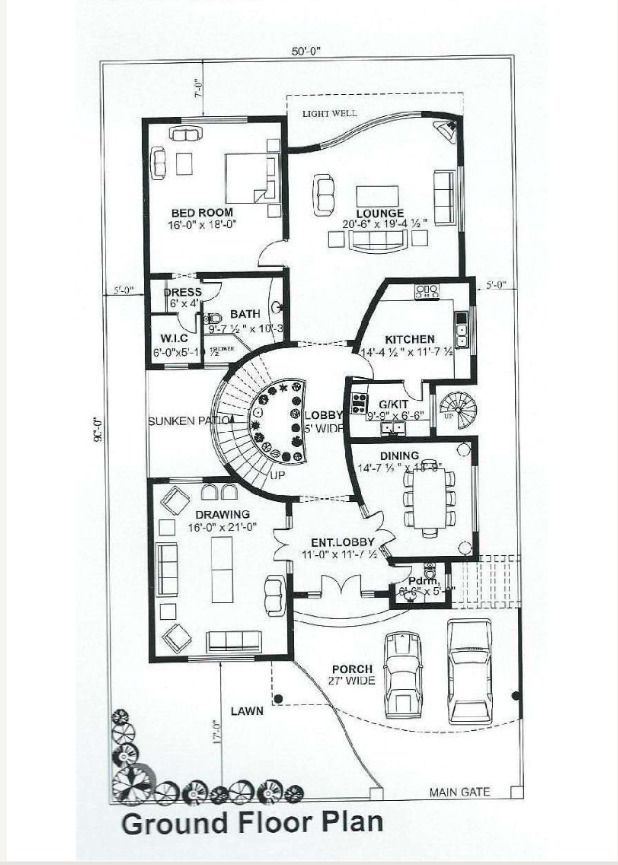
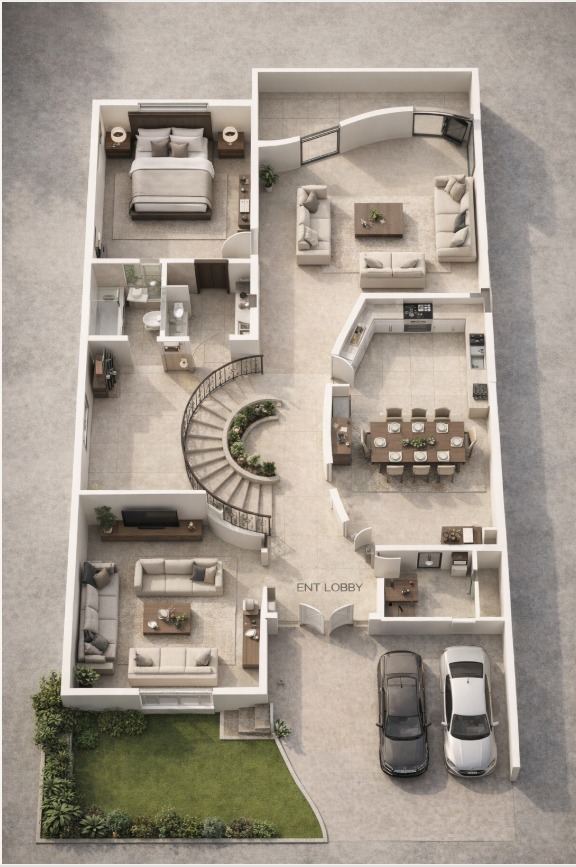
DRAG THE HANDLE — SAME HOME, PLAN TO PHOTOREAL
Then it walks you through, room by room.
Every room gets its own camera path, computed from the plan’s actual door swings.
Want this for your plan?
Watch real product runs, then try it on your own floor plan.
See what's inside
Floor plans, models, costs, renders and walkthroughs — everything one brief produces.
IFC Viewer
Upload any IFC model. Orbit in 3D, inspect properties per element, navigate the model tree, and get AI-powered enhancement suggestions.

Floor Plan Editor
Draw walls, doors, and windows on an interactive 2D canvas. Auto-generated room schedules, live cost estimation, and Vastu analysis built in.

BOQ Visualizer
CSI MasterFormat cost breakdowns with live market pricing from web search. Override unit rates in real time. Export to XLSX or PDF.

Brief to Renders
Upload a PDF brief. AI extracts a strict-faithful spec for you to review and approve. Then it generates photoreal renders and compiles an editorial PDF.


3D Render + Video
Generate concept art from text or images via AI. Convert floor plans into cinematic walkthrough videos rendered by Kling AI at 1080p.
Customer stories
What architects and BIM teams say about BuildFlow
Studios in their own words — it advances on its own, or take over with the arrows, the faces, or a swipe.
We used to bring a client two concept options, because that is all a week allowed. Last month we walked in with nine. They were choosing, not reacting.
9 concepts in a week, not 2
Our QS and I stopped arguing about which spreadsheet was current. The BOQ comes off the same model I drew, so there is only one version of the truth.
One source of truth for BOQ
I am a one-person practice. I cannot keep a visualiser on retainer. The walkthrough now goes out the same evening as the meeting.
Same-day walkthrough delivery
Our IFC used to come back from the structural engineer half-wrong. Now it just opens correctly.
IFC opens clean, first try
Forty-five minutes of reformatting a takeoff, per revision, gone. I priced three schemes in the time one used to take.
45 min to 90 sec per revision
The Vastu check catching a north-entry problem at concept stage saved us a full redesign.
Redesign avoided at concept
01 / 06
Studios building with BuildFlow
Simple, transparent pricing
Choose the plan that fits your workflow
Starter
Solo architects and quantity surveyors
- Floor plans from DWG / DXF files
- Floor Plan Editor — redraw, edit and export
- IFC viewer and IFC Enhance
- BOQ / QTO take-off
- AI 3D models, concept renders and video walkthroughs
- Export IFC, spreadsheets and PDF reports
- Workflow canvas, unlimited runs
- PDF drawing — vector or scannedPro
- Site photo or imagePro
- Hand sketchPro
- Text description → floor planPro
- Shop drawingsPro
- + PDF drawing — vector or scanned
- + Site photo or image
- + Hand sketch
Right if every project already arrives as an IFC, DWG or DXF file.
Pro
Practices delivering construction documents
- Everything in Starter
- Floor plans from PDF, photo or sketch
- Floor plans from a text brief
- DWG / DXF → IFC conversion
- Quantity take-off (from DWG, DXF, PDF)
- Shop drawings
- Full-tour and exterior walkthrough video
- Structura: DWG / DXF → scheme-stage structural package, for your Engineer of Record
- Structura construction timeline (4D progress): steel model + site photos → a 4D progress model, date by date
- Free unlimited concept rendersStudio
- Unused credits roll overStudio
- + Free unlimited concept renders
- + Unused credits roll over
Reads PDFs, photos, sketches and text briefs, and adds the documents a site needs: quantity take-offs, shop drawings and CAD → IFC.
Studio
Studios rendering at volume
- Everything in Pro
- Free unlimited concept renders
- Unused credits roll over
- +10% credits on every top-up
On Pro, 75 concept renders use the whole 7,500-credit month.
On Studio they cost nothing — and 20,000 credits stay for video and 3D.
Concept renders never cost a credit again — all 20,000 credits go to video and 3D.